Out of Office
If you are going to be out of the office you can use this Out of Office feature. When you are out you can let the system know so any new assigned workflow items can be re-routed to another user in your absence.
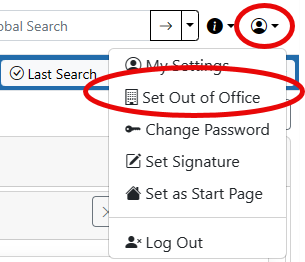
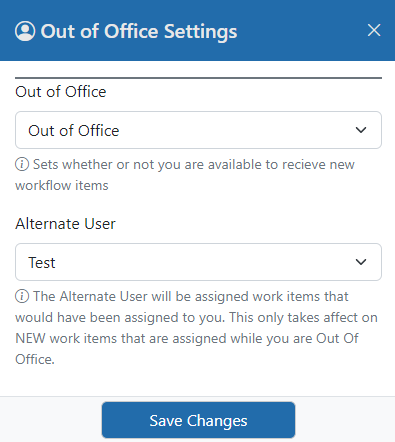
Out of Office and your alternate
When you will be away, open My Settings and set Out of Office to Out of Office, then choose an Alternate User. While you are out, any new workflow item that would have been assigned to you is assigned to your alternate instead. Items that were already on your list before you went out stay with you.
Coming back
When you set yourself back to In the Office and save, workflow steps that are set up to do so hand the items your alternate received on your behalf back to you automatically. A message tells you how many came back, and both you and your alternate receive an email summary. Items your alternate has already completed, routed on, or reassigned to someone else are not affected, and an item your alternate was assigned in their own right, for example as a member of the same team, stays with them. On steps that are not set up to hand items back, your alternate keeps them.
If some items did not come back, for example because your alternate has since left the organization, open the Out of Office panel and click Return my work items now. This hands back anything your alternate is still holding for you on steps that return items. It is safe to click more than once.
An administrator can also do this for you from your user record, and can set you back to In the Office if you cannot.